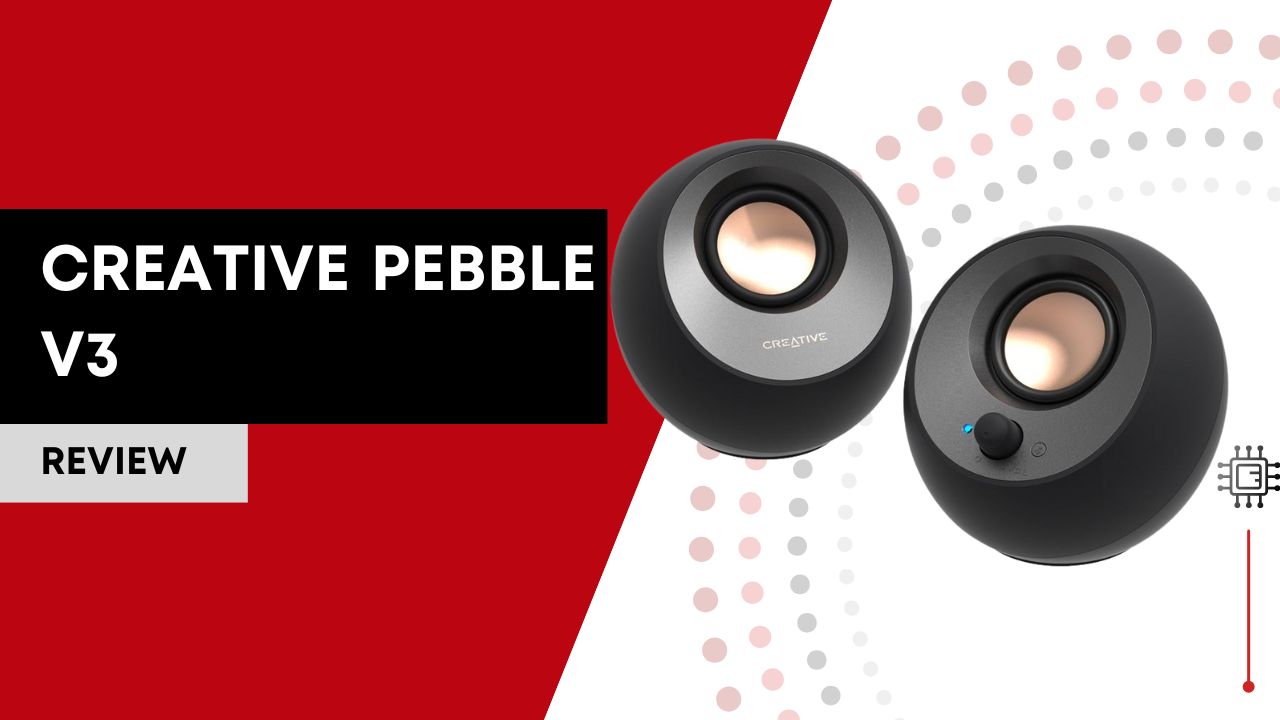

The Creative Pebble V3 is a compact 2.0 desktop speaker system designed to deliver clear, room-filling sound from an ultra-small footprint. Its biggest selling points are modern Bluetooth 5.0, USB-C audio support, and Creative’s Clear Dialog technology for improved voice clarity. For students, home offices, and minimalist desks, it offers one of the best sound-to-size ratios in its price range.
Disclaimer: This review is a comprehensive synthesis of professional reviews, technical breakdowns, and real-user feedback from forums, Reddit threads, user reviews on retailer sites, and expert comparisons. I’ve not used this camera firsthand; everything here reflects what the broader online community actually says about the device. This post contains Amazon affiliate links, and I may earn a commission if you make a purchase.
Table of Contents

Key Features
1. 2.0 Stereo with 2.25″ Full-Range Drivers (8W RMS / 16W Peak)
On paper, these tiny speakers produce up to 8 watts RMS and 16W peak power. That might not sound like much compared to big bookshelf speakers, but in a compact desktop setup, it’s plenty for everyday listening, video calls, background music, and casual gaming. Expect the sound to feel fuller and louder than typical laptop speakers, but don’t expect earth-shaking bass, since small speakers simply can’t move enough air for deep low frequencies.
2. USB-C + Bluetooth 5.0 + AUX-in Connectivity
Unlike many budget speakers that rely solely on a 3.5 mm cable, the Pebble V3 offers multiple ways to connect. USB-C provides both power and audio in one cable, reducing clutter. Bluetooth 5.0 gives reliable wireless playback from phones and tablets, and a traditional 3.5 mm AUX lets you plug in legacy devices. The inclusion of both modern and old-school connections means you won’t get stuck without audio options.
3. Clear Dialog Audio Processing
This feature is more than marketing fluff: it intentionally boosts midrange clarity so voices in movies, podcasts, and meetings come through more distinctly. For content centered around speech (like YouTube, Zoom calls, or series), this can genuinely improve comprehension without cranking volume.
4. 45° Elevated Drivers
Creative’s signature angled driver design directs sound toward your ears, which helps make the soundstage feel wider and more immersive from a seated position at a desk. This isn’t a gimmick; it’s a small but noticeable advantage for desk listening over flat-facing speakers.
5. Compact, Minimalist Design
Pebble V3’s size, roughly 4.8″ × 4.7″ × 4.6″, fits snugly on a desktop without overwhelming your workspace. There’s no subwoofer, no giant enclosures, just sleek satellites that blend into modern setups. Design buffs and productivity-focused users alike will appreciate the low visual footprint.
Setup, Usage & Optimization
Initial Setup
Getting started with the Creative Pebble V3 is simple and straightforward. Unbox the speakers and connect them to your computer, laptop, or mobile device using either the included USB-C cable (for both power and audio) or the 3.5mm AUX cable. For wireless use, enable Bluetooth on your device, press the Pebble V3’s pairing button, and select “Creative Pebble V3” from the available devices. No driver installation is typically required, making it plug-and-play on Windows, macOS, and most modern devices. Ensure your source device supports Bluetooth 5.0 for optimal wireless performance, though older Bluetooth versions are also compatible with slightly reduced range and stability.
Recommended Usage
The Creative Pebble V3 shines as a desktop audio solution for home offices, study areas, or compact entertainment setups. Position the speakers at ear level, ideally angled toward your listening position thanks to the 45° elevated driver design, for a clearer and more immersive soundstage. These speakers are perfect for daily tasks like music playback, video streaming, Zoom calls, and casual gaming, but are less suited for high-volume party environments or bass-heavy audio genres. Keeping them on a stable, flat surface reduces vibration and ensures optimal sound clarity.
Optimization Tips
- Use the USB-C connection whenever possible for the most stable and highest-quality audio.
- Enable Clear Dialog mode for voice-heavy content like podcasts, online meetings, or videos.
- Adjust speaker placement slightly away from walls to reduce unwanted resonance and improve stereo separation.
- Regularly dust and avoid liquids near the speakers to maintain driver performance and longevity.
- For Bluetooth users, keep devices within 10 meters and avoid obstructions to maintain consistent audio quality.
- Consider using a small desk mat or coaster under the speakers to reduce vibrations on hard surfaces, which subtly improves clarity.
Common Mistakes to Avoid
- Placing speakers directly on uneven or soft surfaces that can muffle sound.
- Using only Bluetooth when USB-C is available, which may slightly compromise audio quality.
- Cranking volume to maximum continuously, as small drivers may distort at extreme levels over time.
Real-World Performance & Daily Use
In real everyday use, Creative Pebble V3 punches above its price class. The first thing most reviewers note is how clear the speakers sound given the form factor: vocals and midrange content come through crisp and detailed, and the 45° driver angle really helps the audio focus toward you instead of blasting sideways.
For music listening, these aren’t going to replace a dedicated Hi-Fi system, but they do very well with pop, acoustic tracks, podcasts, and casual playlists. The frequency response (around 100 Hz–17 kHz) means that substantial bass is missing, a common limitation with compact 2.0 designs, but for the majority of desktop environments where space is limited, the output is engaging and often surprisingly strong.
The Bluetooth experience is stable and straightforward: pairing is easy, and range within a typical room (up to ~10 m unobstructed) gives you listening flexibility away from your desk. Switching from wired (USB-C/AUX) to wireless is intuitive and quick.
Daily tasks such as Zoom calls, browsing YouTube, streaming series, or playing casual games all benefit from the Clear Dialog feature, voices are notably easy to understand even with background action. Just be mindful that at very high volumes, you might start to notice slight distortion, which is typical for budget speakers driven at the edge of their power output.
Verified User Feedback
Here’s what real users are actually saying in their own words, pulled from Reddit and community forums:
“I’ve had them for a month or so and I really love them. … Clear sound and no background noise unless you turn it up to 90-100% volume (which you probably won’t do since it’s really loud).”
“They’re quite well balanced from what I’ve heard, but remember Pebble is not portable, it’s just small.”
“Most people don’t seem to be aware that you can find speaker comparisons on YouTube. … I’ve got the Z207 for years now and they’re ok for casual listening but nothing special.”
“I ended up with the V3 and I love them! … I read many people that says the Pebble V3 is great but for some reason the V2 is better, unless the differences are minimal.”
“I can’t believe the Creative Pebble V2 sounds better than the V3. … Violins sound like white noise on the V3s.”
These snippets reveal both praise and criticisms: many users love the sound for the price, but some feel the V3 isn’t a massive upgrade over previous generations, and others think the high frequencies can occasionally get a bit harsh. The consensus, though, is that for daily casual use at a budget level, they’re a solid pick.
Creative Pebble V3 vs Logitech Z207
Here’s how Creative Pebble V3 stacks up against its popular competitor, the Logitech Z207:
| Feature | Creative Pebble V3 | Logitech Z207 |
|---|---|---|
| RMS Power | 8W | 5W |
| Peak Power | 16W | 10W |
| Bluetooth Version | 5.0 | 4.1 |
| USB-C + Bluetooth + AUX | ✔️ | Bluetooth + AUX |
| Clear Dialog Tech | ✔️ | ❌ |
| Ideal for Desk Use | Very compact | Larger footprint |
Comparison Overview
- Power & Clarity: Pebble V3 generally pushes louder with clearer mids and vocals, thanks to higher RMS/peak output and Clear Dialog processing.
- Connectivity: Pebble V3’s modern USB-C + Bluetooth 5.0 advantage feels more future-ready compared to the Z207’s older Bluetooth 4.1 standard.
- Daily Use: For podcasts, YouTube, and dialogue-heavy content, Pebble V3 generally feels more engaging. The Z207 delivers decent room-filling audio but doesn’t quite match Pebble’s crispness.
Who should choose which?
- Go with Creative Pebble V3 if you value modern connectivity (USB-C + Bluetooth 5.0), clearer voice audio, and slightly more power in a compact footprint.
- Choose Logitech Z207 if you want slightly fuller stereo that’s tuned for a broader room and are fine with older Bluetooth tech and simpler controls.
Who This Is For (…and Who It Isn’t)
It’s ideal for:
- Students, remote workers, and home office setups needing a sleek, clutter-free speaker solution.
- Casual music listeners who want better audio than built-in laptop speakers without paying a premium price.
- People who appreciate modern connectivity like USB-C and Bluetooth 5.0.
It’s not ideal for:
- Bass-hungry listeners who want deep low end, a 2.1 system with a dedicated subwoofer would be better.
- Audiophiles or audio professionals, these are budget desktop speakers, not reference monitors.
- Users expecting advanced EQ tuning or app-based customization, Pebble V3 keeps it simple.
Final Thoughts
At a time when many desktop speaker options feel dated or underpowered, the Creative Pebble V3 stands out by offering surprising performance for its price, with modern connectivity, crisp clarity, and clean aesthetics. Yes, there are trade-offs (limited bass, occasional high-frequency ringing for some ears), but as a daily driver for web content, media, and casual music, these compact speakers deliver significant value. In the budget desktop audio space, the Pebble V3 earns its place as one of the most practical and versatile picks.
FAQ
Is the Creative Pebble V3 good for music?
Yes, the Creative Pebble V3 is well-suited for casual music listening, especially pop, acoustic, podcasts, and background playlists. While it doesn’t deliver deep bass, it offers clear vocals and balanced sound for everyday desktop use.
Does the Creative Pebble V3 have good bass?
Bass is present but limited due to the compact 2.0 speaker design and small drivers. If strong bass is a priority, a 2.1 speaker system with a dedicated subwoofer would be a better choice.
Can I use Creative Pebble V3 with a laptop or PC?
Yes, the Creative Pebble V3 works seamlessly with laptops and desktop PCs via USB-C, 3.5mm AUX, or Bluetooth 5.0, making it compatible with Windows, macOS, and most modern devices.
Is Creative Pebble V3 better than Logitech Z207?
The Creative Pebble V3 generally offers clearer dialogue, newer Bluetooth 5.0 connectivity, and USB-C audio support. The Logitech Z207 may sound slightly fuller at higher volumes, but lacks USB audio and modern Bluetooth features.
Does Creative Pebble V3 need an external power adapter?
No, the Creative Pebble V3 is powered via USB, which means it can draw power directly from a PC, laptop, or USB power adapter without needing a dedicated wall plug.