
Table of Contents
Disclosure: As an Amazon Associate, I earn from qualifying purchases. This means that if you click on a link and make a purchase, I may receive a small commission at no additional cost to you.
A clutter-free workspace and seamless typing experience can make a huge difference in your daily productivity, whether you’re working from home or in the office. The best wireless keyboards combine reliable connectivity, long battery life, and ergonomic comfort to help you stay focused without dealing with tangled cables or annoying lag. In this guide, we’ve researched and rounded up the top 8 best wireless keyboards that deliver performance, convenience, and value for every type of user.
Quick Look
| 1 | Best Portable and Budget | Logitech K380 |
| 2 | Best Mechanical | Keychron K2 |
| 3 | Best Full Size | Keychron K10 |
| 4 | Best for Gaming | Razer BlackWidow V4 |
| 5 | Best for Typing | Logitech MX Keys S |
| 6 | Best for Mac | Apple Magic |
| 7 | Best Ergonomic | Logitech Ergo K860 |
| 8 | Best with Touchpad | Logitech K400 Plus |

What are the Best Wireless Keyboards for Faster Typing and Productivity
#1 Logitech K380 Multi-Device Bluetooth Keyboard
Best Budget and Portable Wireless Keyboard for Travel
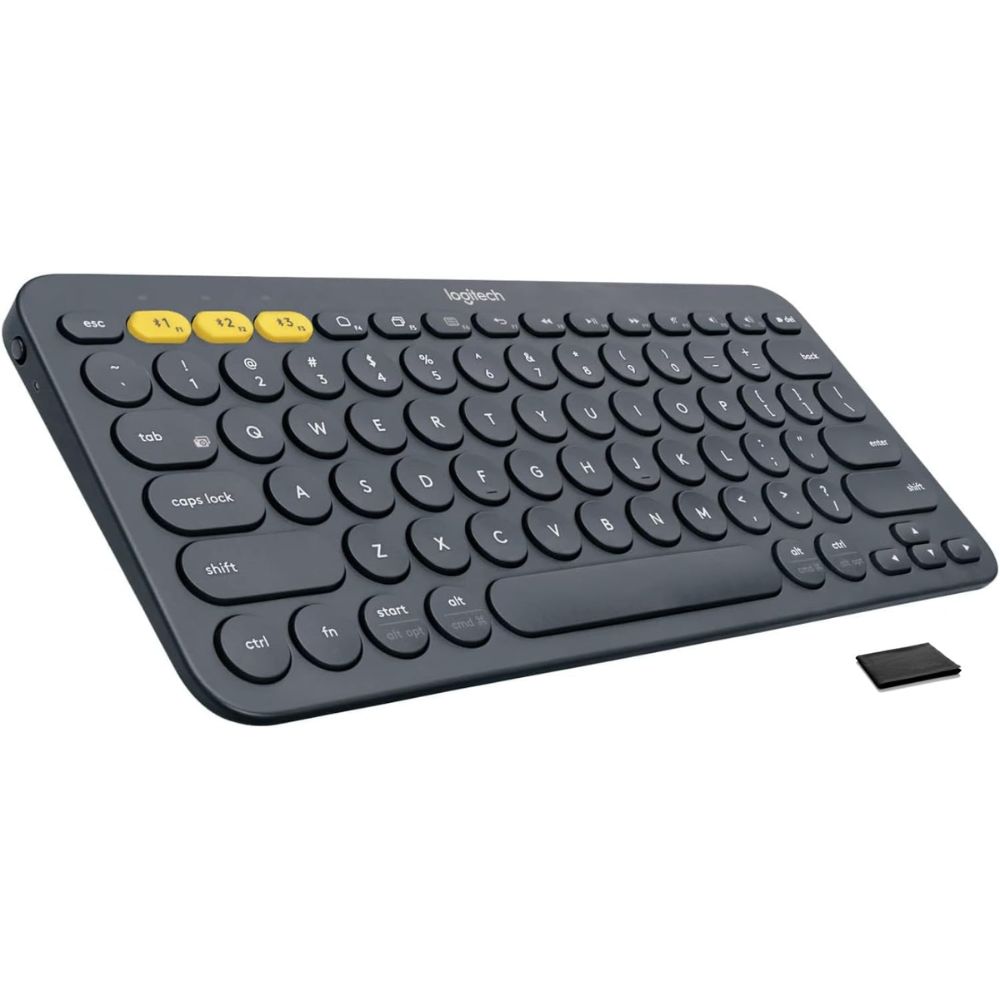
- Ultra-slim and lightweight design perfect for travel and mobility
- Easy-Switch technology connects up to 3 devices simultaneously
- Quiet, comfortable typing with low-profile rounded keys
- Wide compatibility with Windows, macOS, Android, iOS, and more
- Long battery life (up to 2 years with AAA batteries)
The Logitech K380 stands out as one of the best portable wireless keyboards thanks to its compact footprint and seamless multi-device functionality. Designed specifically for users on the go, it easily fits into backpacks or laptop sleeves, making it an excellent companion for travel, remote work, or café productivity sessions. Its lightweight build doesn’t compromise durability, making it reliable for frequent use.
One of the biggest highlights is its Easy-Switch feature, allowing users to connect and switch between up to three devices effortlessly. Whether you’re typing on a laptop, replying to messages on your phone, or working on a tablet, the transition is instant and smooth. This versatility makes it ideal for multitaskers who juggle multiple devices daily.
Typing comfort is another strong point. Despite its compact size, the keyboard offers a surprisingly satisfying typing experience with its low-profile, scooped keys. Users often praise its quiet operation, which is perfect for shared workspaces or late-night work sessions.
Battery life is where the K380 truly excels. With up to two years of usage on a single set of AAA batteries, it eliminates the constant need for charging—something many users appreciate for travel convenience. Overall, it’s a dependable and practical choice for anyone needing portability without sacrificing functionality.
Pros:
- Extremely portable and lightweight
- Excellent multi-device connectivity
- Long-lasting battery life
- Quiet and comfortable typing
Cons:
- No backlighting
- Not ideal for heavy typing workloads
- Uses disposable batteries instead of rechargeable
Ideal for students, remote workers, digital nomads, and travelers who need a compact, reliable keyboard that works seamlessly across multiple devices.
#2 Keychron K2 Wireless Mechanical Keyboard
Best Mechanical Wireless Keyboard
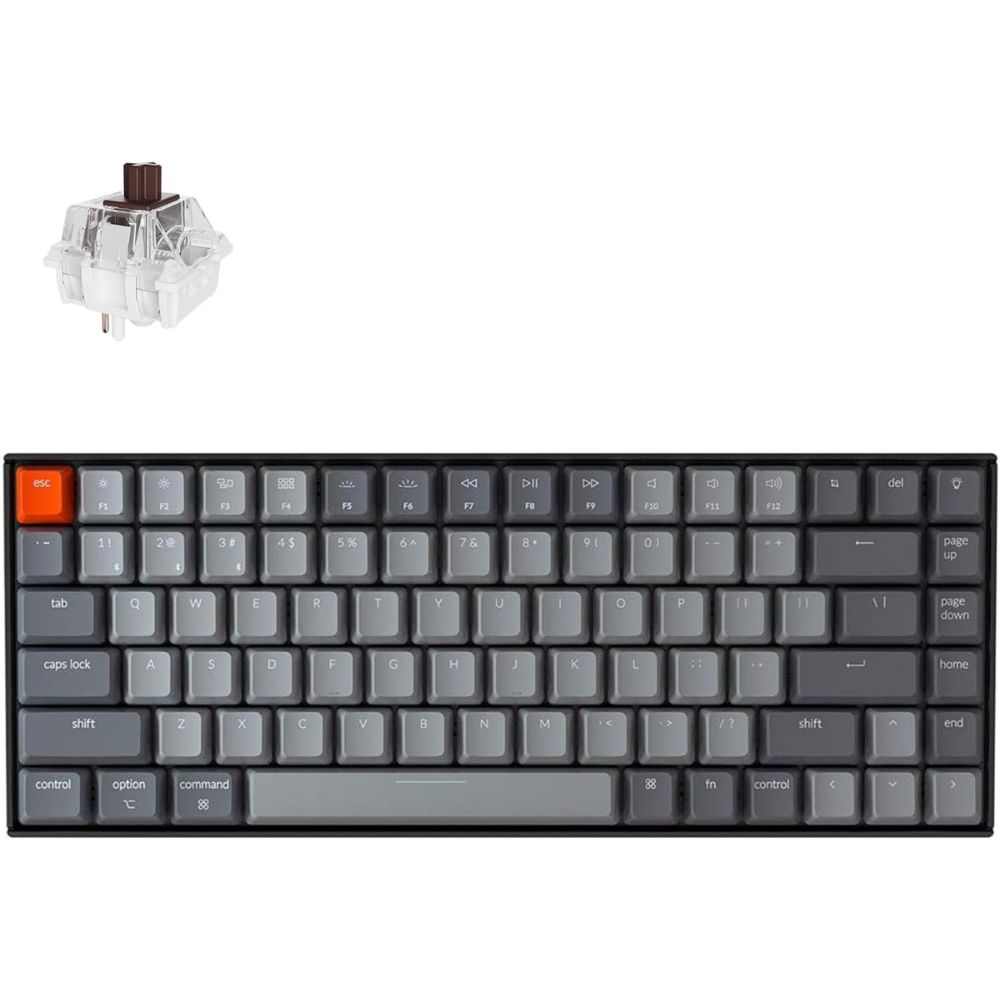
- Compact 75% layout with full mechanical performance
- Wireless Bluetooth + wired USB-C dual connectivity
- Gateron mechanical switches for tactile typing
- White or RGB backlighting options
- Mac & Windows compatibility with dedicated keycaps
The Keychron K2 is widely regarded as one of the best wireless mechanical keyboards due to its balance of performance, portability, and versatility. Its 75% layout retains essential keys while saving desk space, making it perfect for both office setups and minimalist workstations.
One of its standout features is the dual connectivity mode. Users can seamlessly switch between Bluetooth for wireless convenience and USB-C for low-latency wired performance. This flexibility makes it suitable for both casual users and professionals who demand reliability during intensive tasks.
Typing experience is where the K2 truly shines. With Gateron mechanical switches, users can choose between tactile, clicky, or linear feedback depending on their preference. The typing feel is highly praised in user reviews, especially for long writing or coding sessions.
Additionally, the large 4000mAh battery ensures extended usage, often lasting several days even with backlighting enabled. Combined with Mac and Windows compatibility, the Keychron K2 becomes a versatile powerhouse for productivity-focused users.
Pros:
- Excellent mechanical typing experience
- Strong battery life
- Dual connectivity (Bluetooth + wired)
- Compact yet functional layout
Cons:
- Slightly thick design
- Learning curve for compact layout
- No dedicated number pad
Perfect for writers, programmers, and mechanical keyboard enthusiasts who want a compact yet powerful wireless keyboard.
#3 Keychron K10 Full Size Wireless Mechanical Keyboard
Best Full-Size Wireless Keyboard
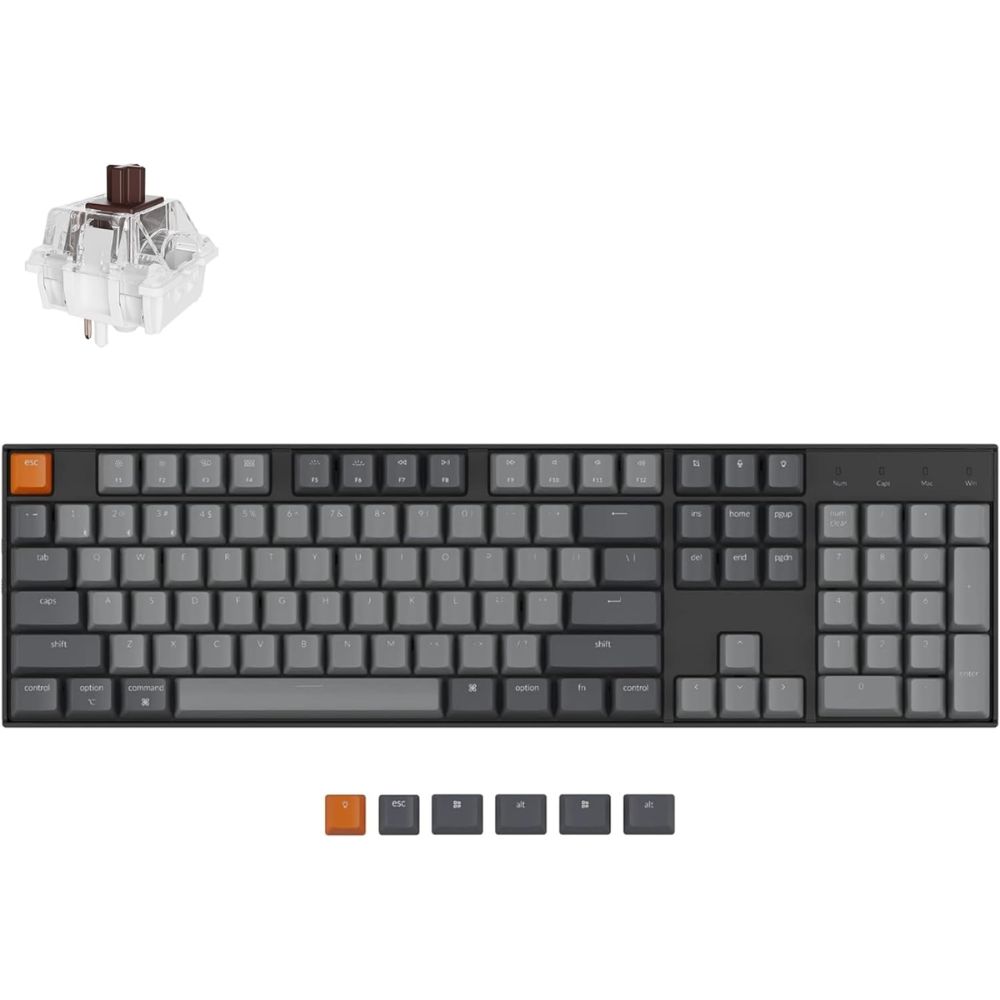
- Full-size layout with number pad for maximum productivity
- Wireless Bluetooth + USB-C wired connectivity
- Premium mechanical switches (Gateron)
- Large battery capacity for extended use
- Compatible with Mac and Windows
The Keychron K10 is the ideal choice for users who need a full-size keyboard without sacrificing wireless convenience. Unlike compact keyboards, it offers a dedicated number pad, function row, and full navigation cluster—making it perfect for data entry, finance work, and office productivity.
Its wireless performance is highly reliable, supporting multiple device connections via Bluetooth. Switching between devices is smooth, making it suitable for professionals managing multiple systems. The option to switch to wired mode ensures zero latency when needed.
Typing experience is top-tier thanks to the mechanical switches. Whether you prefer a soft linear press or a tactile bump, the K10 delivers consistent and satisfying feedback. Many users highlight its durability and premium feel, especially with the aluminum frame option.
Battery performance is another strong point, allowing extended use even with RGB lighting enabled. Overall, the Keychron K10 combines traditional keyboard functionality with modern wireless convenience, making it one of the best full-size options available.
Pros:
- Full-size layout with number pad
- Excellent typing feel
- Reliable wireless connectivity
- Long battery life
Cons:
- Bulky compared to compact keyboards
- Heavier design
- Less portable
Best suited for office professionals, accountants, and users who need a full-size keyboard for heavy typing or numeric input tasks.
#4 Razer BlackWidow V4 Pro Wireless Keyboard
Best Wireless Keyboard for Gaming
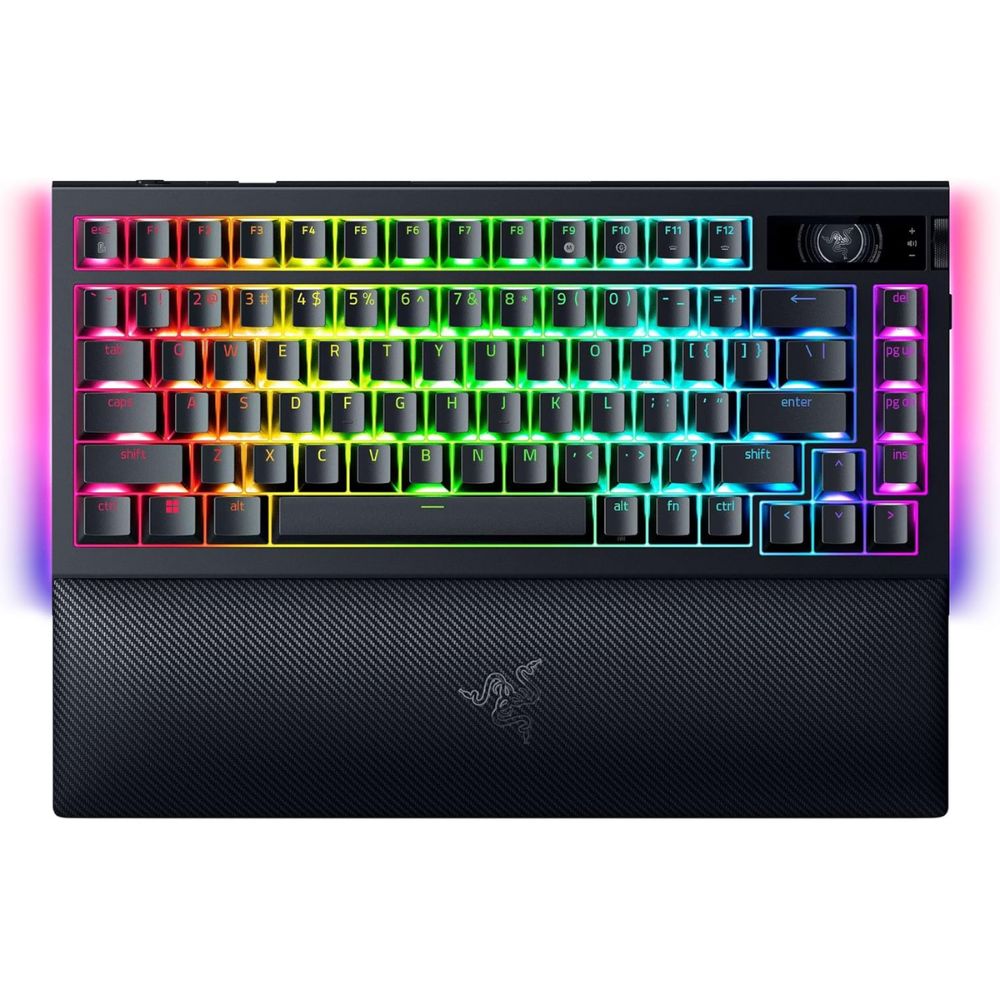
- High-performance mechanical gaming keyboard
- Wireless + wired connectivity for low latency gaming
- Per-key RGB lighting with customization
- Dedicated macro keys and media controls
- Premium build with wrist rest
The Razer BlackWidow V4 Pro Wireless is built specifically for gamers who demand speed, precision, and customization. Its wireless performance is optimized for low latency, ensuring that gameplay remains smooth and responsive even in competitive scenarios.
One of its biggest strengths is the customization it offers. With Razer Chroma RGB lighting, users can personalize every key, creating immersive setups. The addition of macro keys allows gamers to assign complex commands, giving them a competitive edge in fast-paced games.
Typing and gaming performance are equally impressive. The mechanical switches deliver fast actuation and satisfying feedback, making it suitable for both gaming and productivity tasks. Many users appreciate the tactile response and durability during extended sessions.
The inclusion of a wrist rest and premium build quality enhances comfort during long gaming hours. While it’s a high-end option, its performance and features justify the investment for serious gamers looking for the best wireless experience.
Pros:
- Excellent gaming performance
- Advanced RGB customization
- Dedicated macro and media controls
- Premium build quality
Cons:
- Expensive
- Bulky design
- Overkill for casual users
Ideal for gamers, streamers, and power users who want a high-performance wireless keyboard with advanced customization and low latency.
#5 Logitech MX Keys S Wireless Keyboard
Best Wireless Keyboard for Typing
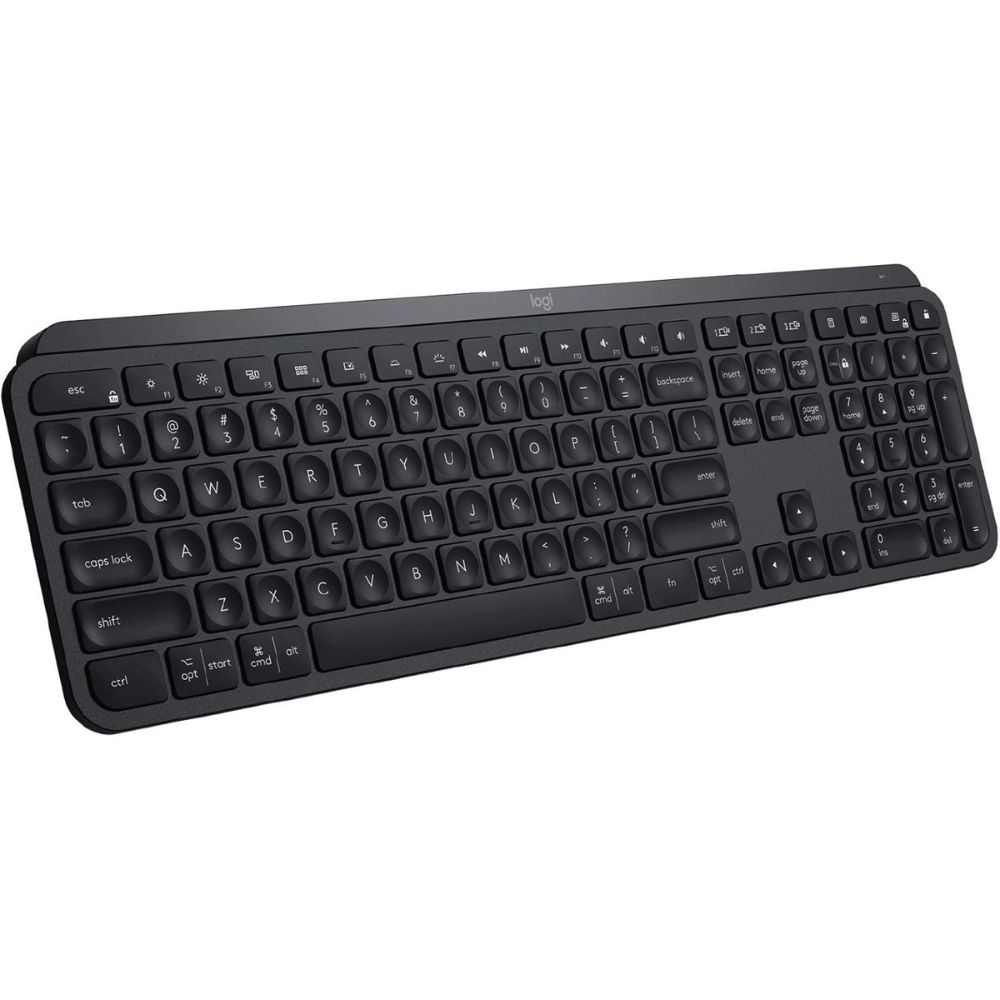
- Spherically-dished keys for precise and comfortable typing
- Smart backlighting that adjusts automatically to lighting conditions
- Multi-device connectivity (up to 3 devices)
- Quiet, low-profile keys for distraction-free work
- Programmable Smart Actions for workflow automation
The Logitech MX Keys S is widely considered one of the best wireless keyboards for typing, thanks to its refined design and exceptional typing experience. The standout feature is its spherically-dished keys, which are shaped to match your fingertips, helping improve accuracy and reduce typing fatigue. This design ensures fewer mistakes and a smoother workflow, especially during long typing sessions.
Another major advantage is the keyboard’s smart illumination system. The backlit keys automatically light up when your hands approach and adjust brightness based on ambient lighting. This not only enhances usability in low-light environments but also helps conserve battery life—something many users appreciate in real-world usage.
In terms of performance, the MX Keys S delivers a quiet and tactile typing experience that strikes a perfect balance between comfort and responsiveness. Reviews consistently highlight its premium build quality and near-silent keystrokes, making it ideal for office environments or shared workspaces.
Additionally, the ability to connect to multiple devices and switch seamlessly makes it highly versatile. Whether you’re working across a laptop, desktop, or tablet, the MX Keys S maintains a stable connection and smooth performance, making it a top choice for productivity-focused users.
Pros:
- Exceptional typing comfort and accuracy
- Premium build quality
- Smart backlighting feature
- Multi-device support
Cons:
- Not ideal for gaming
- Slightly expensive
- Not very portable
Perfect for writers, office professionals, programmers, and anyone who spends long hours typing and values comfort, accuracy, and quiet performance.
#6 Apple Magic Keyboard with Touch ID
Best Wireless Keyboard for Mac
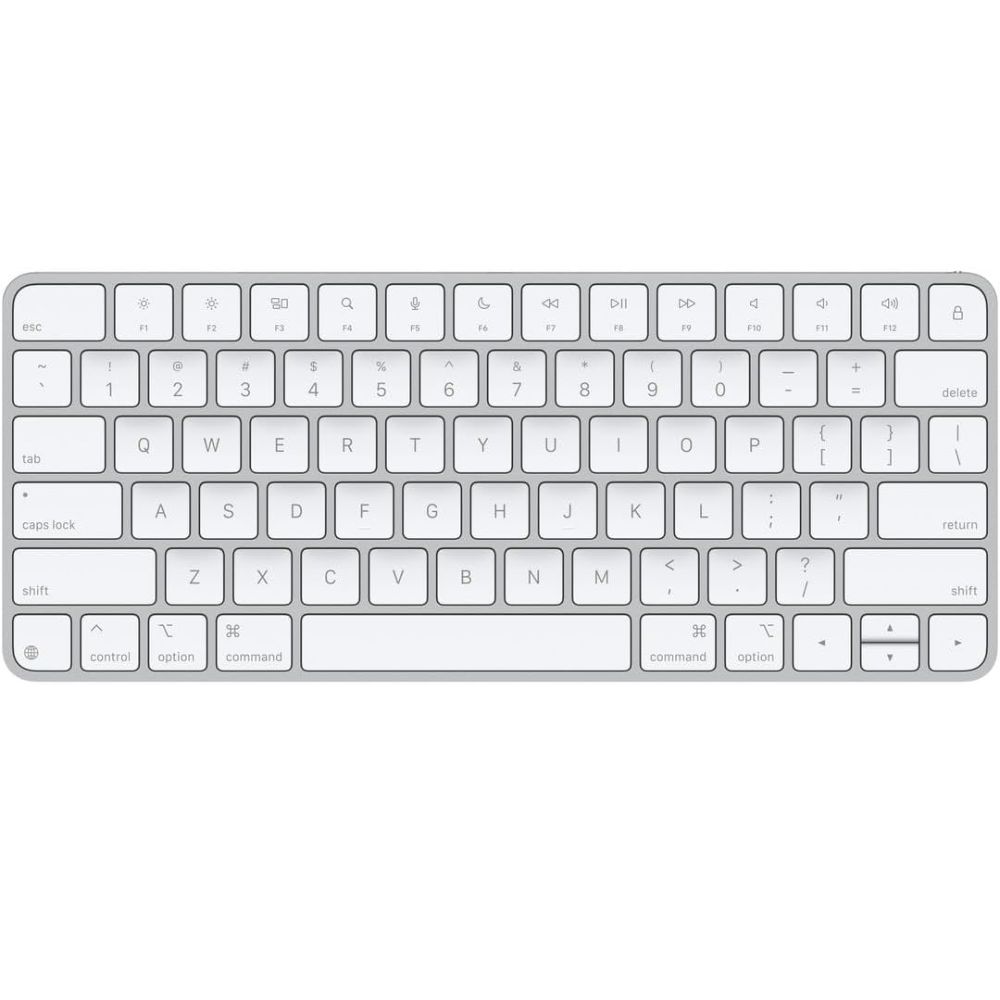
- Seamless integration with macOS and Apple ecosystem
- Built-in Touch ID for secure login and payments
- Ultra-slim, minimalist Apple design
- Rechargeable battery with long life
- Optimized key layout for Mac users
The Apple Magic Keyboard with Touch ID is the ultimate choice for Mac users who want seamless integration and a clean, minimalist experience. Designed specifically for macOS, it offers perfect compatibility with Apple devices, ensuring all function keys and shortcuts work exactly as expected without any setup.
The standout feature is Touch ID, which allows users to unlock their Mac, authorize payments, and access secure apps with just a fingerprint. This adds both convenience and an extra layer of security, making it particularly useful for professionals handling sensitive data.
Typing on the Magic Keyboard is smooth and consistent, thanks to Apple’s scissor-switch mechanism. While it doesn’t offer the tactile feedback of mechanical keyboards, it provides a stable and quiet typing experience that many Mac users prefer for everyday tasks.
Battery life is another strong point, lasting weeks on a single charge. Combined with its sleek aluminum build and lightweight design, the Magic Keyboard fits perfectly into Apple’s ecosystem, both aesthetically and functionally.
Pros:
- Seamless macOS integration
- Built-in Touch ID security
- Sleek and premium design
- Long battery life
Cons:
- Expensive compared to alternatives
- Limited compatibility outside Apple ecosystem
- No backlighting
Ideal for Mac users, Apple ecosystem enthusiasts, and professionals who want a clean, secure, and fully optimized keyboard experience.
#7 Logitech Ergo K860 Wireless Ergonomic Keyboard
Best Ergonomic Wireless Keyboard
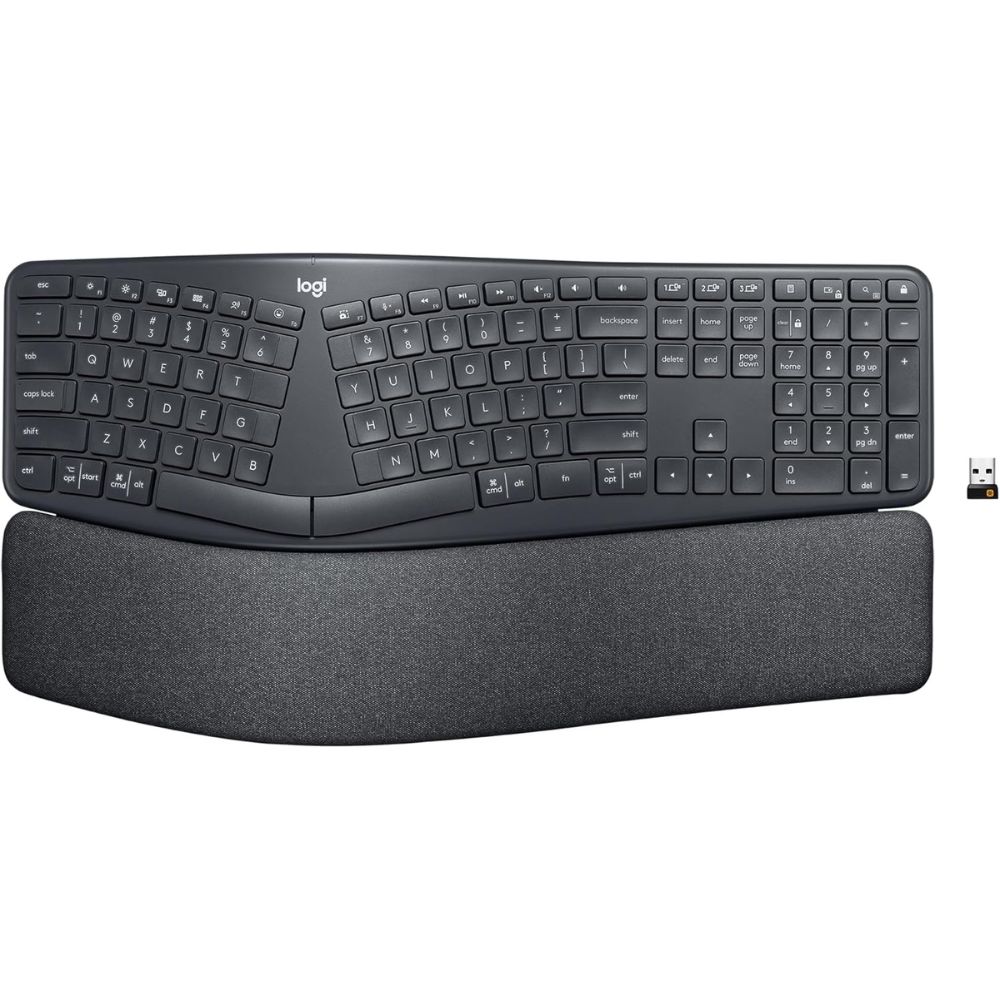
- Split ergonomic design reduces wrist strain
- Curved keyframe promotes natural typing posture
- Cushioned wrist rest for added comfort
- Adjustable tilt for personalized ergonomics
- Multi-device connectivity
The Logitech Ergo K860 is designed with ergonomics as the top priority, making it one of the best wireless keyboards for reducing strain and improving comfort. Its split keyboard layout encourages a more natural hand position, which helps reduce tension in the wrists and forearms during extended typing sessions.
The curved keyframe is another key feature that sets it apart. It gently guides your hands into a more relaxed posture, minimizing unnatural angles that can lead to discomfort or repetitive strain injuries. This design is especially beneficial for users who spend long hours at their desks.
Comfort is further enhanced by the built-in cushioned wrist rest. Unlike standard keyboards, the Ergo K860 provides consistent support, helping maintain proper wrist alignment. Many users report noticeable improvements in comfort and reduced fatigue after switching to this keyboard.
Despite its ergonomic focus, the keyboard doesn’t compromise on functionality. It supports multi-device connectivity and offers a familiar full-size layout, making it easy to transition from a traditional keyboard while still benefiting from improved ergonomics.
Pros:
- Excellent ergonomic design
- Reduces wrist and arm strain
- Comfortable wrist rest included
- Reliable wireless performance
Cons:
- Bulky design
- Takes time to adjust
- Not ideal for portability
Best for professionals, writers, and remote workers who prioritize comfort and want to reduce wrist strain during long hours of typing.
#8 Logitech K400 Plus Wireless Touch TV Keyboard
Best Wireless Keyboard with Touchpad
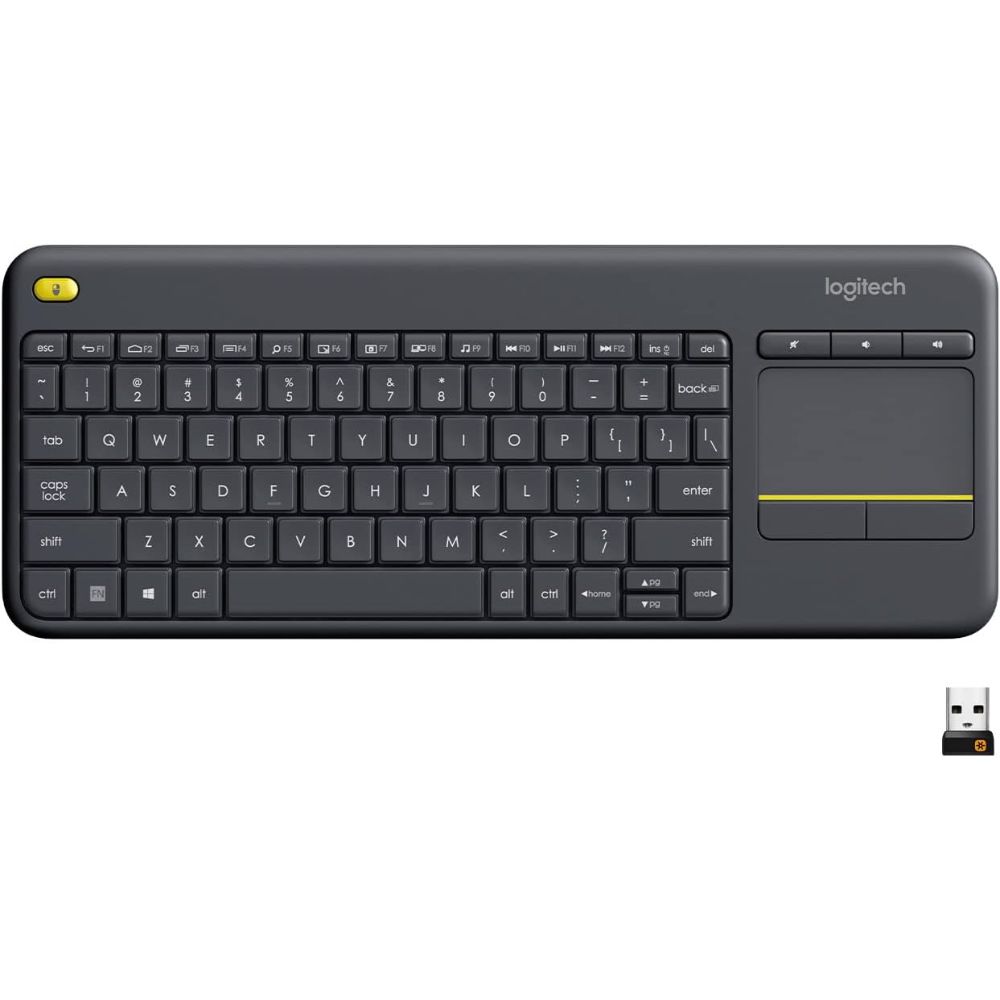
- Built-in touchpad for easy navigation without a mouse
- Compact, all-in-one design ideal for media control
- Reliable 2.4GHz wireless connection with USB receiver
- Long battery life (up to 18 months)
- Plug-and-play setup with wide compatibility
The Logitech K400 Plus is one of the best wireless keyboards with a touchpad, designed specifically for convenience and simplicity. Its all-in-one layout eliminates the need for a separate mouse, making it perfect for controlling smart TVs, home theater PCs, or presentations from a distance. This makes it especially useful for users who want a clean and minimal setup.
The built-in touchpad is the standout feature, offering smooth and responsive navigation. It supports basic gestures and allows users to control their device effortlessly from the couch or across the room. Many users appreciate how intuitive it feels, especially for media browsing and streaming applications.
In terms of connectivity, the 2.4GHz wireless connection provides a stable and lag-free experience within a range of up to 10 meters. The plug-and-play USB receiver ensures quick setup without the need for additional software, which is a big plus for non-technical users.
Battery life is another strong advantage. With up to 18 months of usage on just two AA batteries, the K400 Plus is highly efficient and low-maintenance. Overall, it’s a practical and user-friendly solution for those who prioritize convenience and media control over traditional typing performance.
Pros:
- Excellent ergonomic design
- Reduces wrist and arm strain
- Comfortable wrist rest included
- Reliable wireless performance
Cons:
- Bulky design
- Takes time to adjust
- Not ideal for portability
Best for professionals, writers, and remote workers who prioritize comfort and want to reduce wrist strain during long hours of typing.
How to Choose the Best Wireless Keyboard
Choosing the best wireless keyboard depends on how and where you plan to use it. Start by considering your primary use case, whether it’s typing, gaming, travel, or office work. For example, if you type for long hours, prioritize comfort and key design, while gamers should look for low latency and responsive switches when selecting the best wireless keyboard.
Connectivity is another key factor. Most options offer Bluetooth, USB receivers, or both. If you frequently switch between devices, a multi-device keyboard can significantly improve productivity. A stable connection is essential when choosing the best wireless keyboard, as it ensures smooth, lag-free performance.
Battery life also plays a major role. Some keyboards use rechargeable batteries, while others rely on disposable ones. If you prefer convenience, look for long battery life or fast charging features; both are important traits of the best wireless keyboard for daily use.
Don’t overlook ergonomics and layout. Full-size keyboards are great for productivity, while compact layouts are ideal for portability. Ergonomic designs can reduce wrist strain, making them a smart investment if you spend hours typing. Finding the best wireless keyboard means balancing comfort with functionality.
Finally, consider build quality and extra features like backlighting, programmable keys, or compatibility with your operating system. The best wireless keyboard is one that fits seamlessly into your workflow, enhances your productivity, and feels comfortable to use every day.
Final Verdict
Which Wireless Keyboard Should You Choose?
Choosing the best wireless keyboard ultimately comes down to your specific needs, because each of these options excels in a different category of performance, comfort, and usability.
If you want an all-rounder for everyday typing and productivity, the Logitech K380 is a fantastic budget-friendly pick. Its compact size, multi-device support, and portability make it ideal for users who work across multiple devices or travel frequently.
For those who prioritize premium typing experience, the Logitech MX Keys S stands out as the top choice. It delivers exceptional comfort, quiet keystrokes, and smart features, making it the best option for long writing or office sessions.
Mechanical keyboard enthusiasts will appreciate the Keychron lineup:
- The K2 is perfect if you want a compact mechanical keyboard
- The K10 is the better choice if you need a full-size layout with a number pad
Gamers, on the other hand, should go straight for the Razer BlackWidow V4 Pro Wireless, thanks to its low latency, customizable RGB, and macro capabilities, making it the most powerful keyboard on this list.
If you’re deep into the Apple ecosystem, the Apple Magic Keyboard with Touch ID is unmatched in terms of seamless integration, security, and minimalist design.
Finally, for users focused on comfort and long-term health, the Logitech Ergo K860 is the clear winner. Its ergonomic split design and wrist support make it ideal for reducing strain during extended typing sessions.
FAQs About Wireless Keyboards
What is the best wireless keyboard for office and home use?
The best wireless keyboard depends on your needs, but models like the Logitech MX Keys S and Keychron K2 are popular choices for their comfort, reliability, and multi-device support.
Are wireless keyboards good for productivity?
Yes, the best wireless keyboard can significantly improve productivity by reducing cable clutter, offering flexible connectivity, and providing a comfortable typing experience for long hours.
Do wireless keyboards have input lag?
Modern wireless keyboards use advanced Bluetooth or USB receivers to minimize lag. The best wireless keyboard options offer stable, low-latency performance suitable even for gaming and professional work.
How long does a wireless keyboard battery last?
Battery life varies by model. The best wireless keyboard can last anywhere from a few days (with backlighting) to several months or even years on a single charge or battery set.
Which wireless keyboard is best for ergonomics and comfort?
Ergonomic models like the Logitech Ergo K860 are designed to reduce wrist strain. Choosing the best wireless keyboard with proper support can improve comfort and prevent fatigue during long typing sessions.